From Kitchen Chaos to KDP Success: Your Cookbook Interior Template Explained
For anyone passionate about food and recipes, the dream of creating a cookbook is powerful. It’s a way to share family traditions, showcase culinary expertise, or simply organize your favorite meals. Yet, the step between collecting recipes on scattered notes and publishing a polished book for sale can feel daunting. This is where a structured tool like a Cookbook KDP Interior Template becomes the critical bridge, transforming your personal project into a professional product.
In essence, a Cookbook KDP Interior Template is a pre-designed, print-ready document framework. It is not the recipes themselves, but the vessel that holds them. It provides the consistent layout, typography, section formatting, and page structure that gives a cookbook its professional feel. This template fits into the broader publishing process on Amazon’s Kindle Direct Publishing (KDP) platform as the core interior file you will upload. Your workflow moves from ideation and recipe creation to design and formatting, culminating in the upload and publication phase. The template handles the complex design phase, allowing you to focus entirely on content.
The Practical Role of the Template in Your Publishing Workflow
Imagine your workflow without a template. You might open a word processor and start typing, manually setting margins, creating a table of contents, deciding on font sizes for headings versus ingredient lists, and worrying about page breaks. This ad-hoc approach consumes time and often results in inconsistencies—one recipe’s instructions might be in a different font than the next. A Cookbook KDP Interior Template eliminates this variability. It is used during the content compilation phase, acting as the canvas you fill.
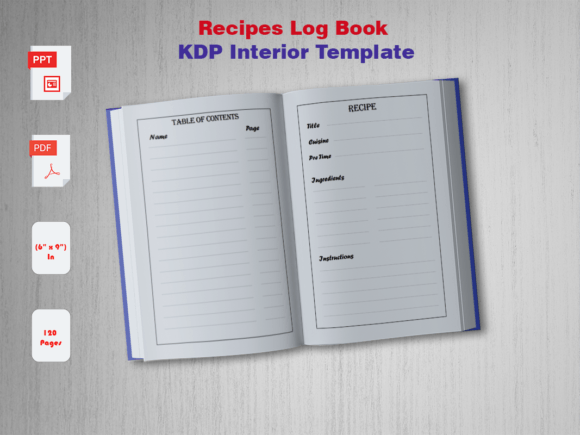
Before you even begin typing your first recipe, selecting the right template is a preparatory step. It sets the standard for your entire project. You must consider compatibility: the template dimensions (like 6" x 9") must match your planned book size. The "No Bleed" specification, common for interiors, means all critical content is safely within margins, which is vital for print quality. By starting with a template that is already a "High-Quality Print Ready PDF," you are guaranteeing that the foundational technical requirements for KDP are met from day one.
Integration with Your Creative Process and Other Assets
The template does not exist alone. It interacts directly with your content assets—the recipe text, photos, and any introductory chapters. A well-designed template will have clearly labeled placeholder pages for sections like a dedication, introduction, table of contents, recipe chapters (e.g., "Breakfast," "Dinners"), and perhaps an index. This provides organizational scaffolding. You also interact with the source files, like PowerPoint (PPT) or PNG, which allow for customization. If the provided font or color scheme doesn’t perfectly match your vision, the PPT source files enable you to adjust it without needing advanced design software, maintaining efficiency.
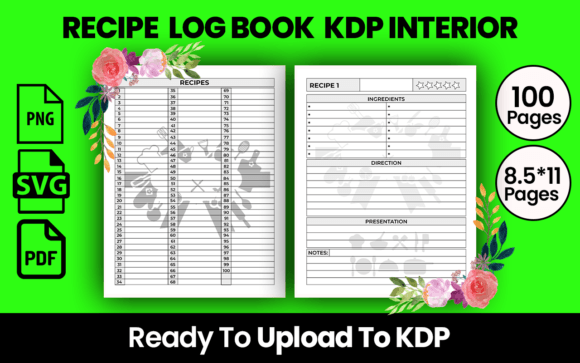
For the productivity-minded user, this integration is key. You can adopt a batch-processing method: first, gather and finalize all recipes in a simple text document. Second, import or type them systematically into the template's pre-formatted recipe pages. Each page is already designed with areas for the recipe title, serving count, ingredients list (often in a neat bulleted format), and step-by-step instructions. This ensures every recipe maintains consistent quality control in presentation, which readers appreciate for usability.
Implementing the Template: A Streamlined Approach
To integrate the Cookbook KDP Interior Template smoothly, follow a process-oriented approach. Begin by downloading and reviewing the template files. Open the PDF to see the final look, and open the PowerPoint source file to understand the editable components. Make any broad customizations first—changing a theme color, selecting a new font if desired. Lock down these style decisions upfront to ensure consistency.
Next, organize your recipes logically. Map them to the chapter pages in the template. The template’s structure forces you to think about categorization, which improves the reader's experience. Then, start the content population. Use the template's predefined styles. For example, always use the "Recipe Title" text box for titles and the "Ingredients" list area for ingredients. This disciplined use prevents layout errors. If including photos, the template will often have image placeholder frames with set dimensions, guiding you to resize your pictures to fit neatly, avoiding awkward page layouts.
Consider this workflow example: A blogger wanting to compile their popular online recipes into a sellable book. They have the content, but lack design skills and time. They purchase a Blank Cookbook KDP Interior Template. They use the PowerPoint file to simply change the header color to match their blog's brand. Then, they copy-paste each recipe from their blog post directly into the corresponding formatted pages in the PowerPoint file. Within a day or two, they have a complete, professionally laid-out interior PDF ready for KDP upload, without ever hiring a designer or learning complex layout software.
Long-Term Use and Outcome Considerations
A high-quality template is not just for one project. For entrepreneurs or small business owners planning a series of cookbooks (e.g., "Summer Grilling," "Winter Comfort Foods"), using the same template base ensures brand consistency across publications. The source files allow you to create volume after volume with the same recognizable interior style, building a cohesive product line. This is a significant efficiency gain over starting fresh each time.
The ultimate outcome of using a Cookbook KDP Interior Template is a product that meets market expectations. Physical cookbooks have a familiar, reader-friendly structure. A template ensures your self-published book matches that professional standard, increasing its credibility and likelihood of positive reviews. It also dramatically reduces the time-to-market. Instead of weeks of design and layout trial and error, your time is focused on perfecting the recipes and marketing the book. The template handles the print-ready technicalities, from margins to font sizing, so you can be confident the final printed book will look exactly as you designed it on screen.
Key Factors for a Successful Template Experience
When adopting this tool, a few practical observations will enhance your results. First, preparation is still crucial. Ensure your recipes are proofread and finalized before populating the template to avoid multiple rounds of edits within the design file. Second, understand the usability of the source files. PowerPoint is widely accessible; learn how to use its "Master Slide" feature if the template uses it, as this is where global changes (like altering the font on every page) can be made efficiently.
Third, respect the template's boundaries. The "No Bleed" specification means you should not place essential text or images right at the very edge of the page. Keep content within the visible margins shown. This is a critical aspect of print quality control. Finally, think about the reader’s journey. A good template organizes information logically. Use it to create a clear table of contents and pagination. This thoughtful organization, facilitated by the template's structure, makes your cookbook not just a collection of recipes, but a usable kitchen tool.
In conclusion, a Cookbook KDP Interior Template is the pragmatic engine for turning culinary passion into a published reality. It fits into the creator’s workflow as the essential formatting and standardization tool, interacting seamlessly with your content and the KDP platform’s requirements. By providing a ready-made structure, it removes the technical barriers of book design, allowing chefs, food bloggers, family historians, and entrepreneurs to focus on what matters most: sharing their love of food through beautifully presented, professional recipes. The downloadable "Blank Cookbook" with its PDF and source files isn’t just a product; it’s a partner in your publishing process.